Blog
Make manga with an AI agent: the MangaMade MCP server and API
Connect an AI agent to MangaMade over MCP or the REST API, then plan, price, draw and export manga chapters from a chat or a script.
Published October 15, 2026 · 6 min read

AI agents are everywhere in 2026: coding assistants that run commands, desktop assistants that use tools, pipelines that chain models together. The Model Context Protocol, MCP, is how most of them talk to outside services. MangaMade now speaks it. Connect your agent once and you can ask it to plan chapter three of your series, tell you what it will cost, draw it and hand you the PDF, without opening the editor. Here is how to set it up, what the agent can do, and what it looks like in practice.
What MCP is, in one paragraph
MCP is an open protocol that lets an AI assistant discover and call tools on a server. The server describes each tool, what it needs and what it returns; the assistant decides when to call it based on what you ask. MangaMade’s MCP server is a thin layer over the same services the app uses, so everything an agent does follows the app’s rules: the same credits, the same moderation, the same limits.
Connect your agent in two minutes
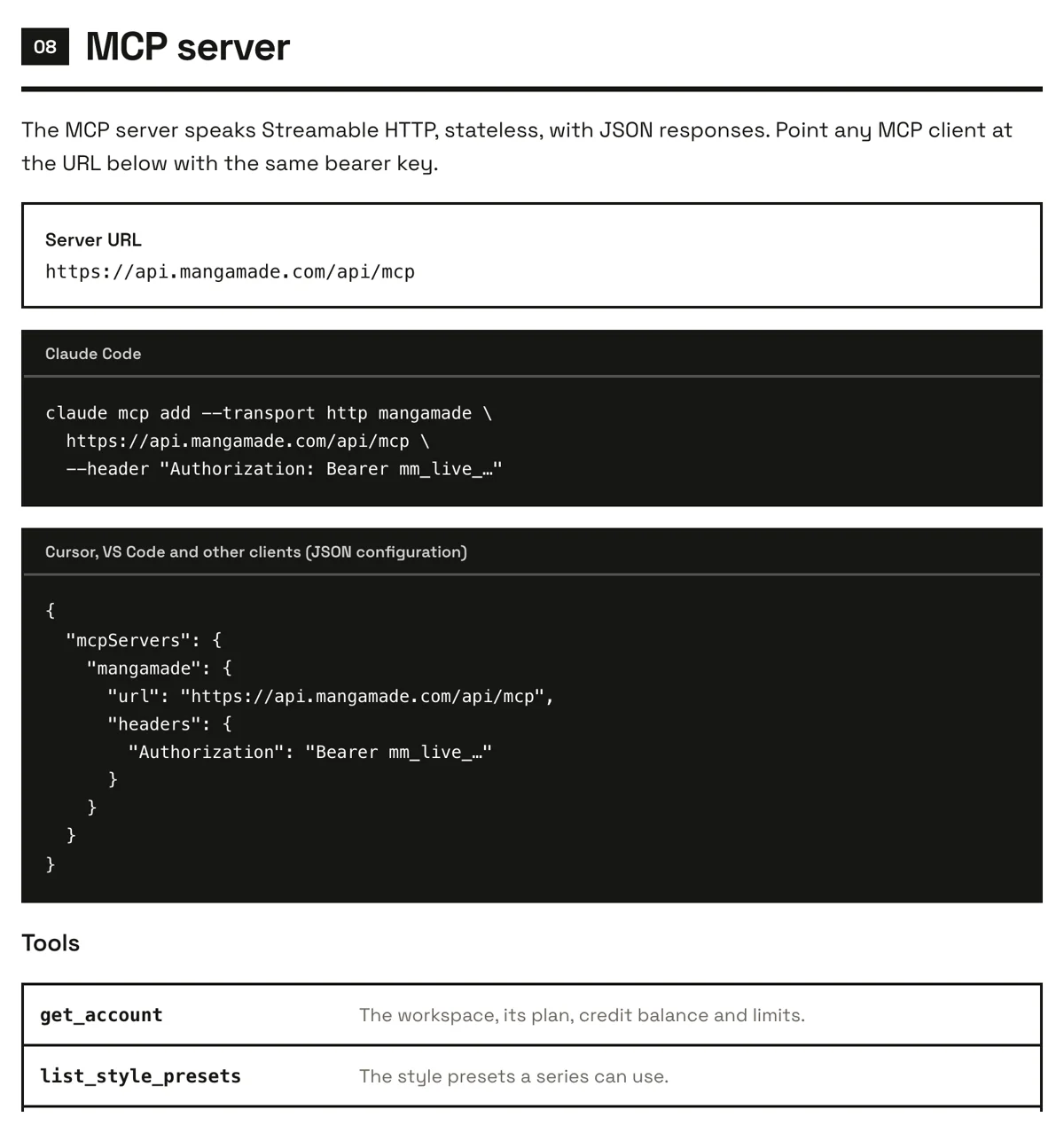
- In MangaMade, open API keys from the app menu and create a key. It starts with mm_live_ and is shown only once, so copy it somewhere safe.
- Add the server to your client with the key as a bearer token, using one of the two snippets below.
- Ask the agent something simple, such as what plan and credit balance your workspace has, to check the connection.
claude mcp add --transport http mangamade \
  https://api.mangamade.com/api/mcp \
--header "Authorization: Bearer mm_live_…"{
"mcpServers": {
"mangamade": {
"url": "https://api.mangamade.com/api/mcp",
"headers": {
"Authorization": "Bearer mm_live_…"
}
}
}
}The server speaks Streamable HTTP, statelessly, with JSON responses. A client that cannot send a header is not supported yet.
What the agent can do
The server exposes 19 tools that follow the path of a chapter in the app:
- Look around: get_account for the plan, balance and limits, list_style_presets, list_series and get_series.
- Set up a story: create_series from a title, format, style and premise, create_character, then generate_character_sheet and create_style_anchor for the references every panel is drawn against.
- Write the chapter: create_chapter from a brief, plan_chapter to write the script, get_chapter and get_chapter_pages to read it back.
- Draw it: estimate_generation for the price in credits, generate_chapter to draw the panels, list_generation_batches to follow progress.
- Ship it: create_export for PNG pages, a PDF or a CBZ, which waits for the file and returns a download link valid for 24 hours, and get_export to check on a longer export.
An example session
With the server connected, a whole chapter can come from two sentences. You ask the agent to plan chapter three of your series and tell you what it will cost. It reads the series, creates the chapter, has it planned and asks for an estimate, then answers in plain words: eight pages, thirty-six panels, and the credits it will take. You say draw it and export a PDF, and it starts the drawing, follows the batches and comes back with a download link.
Everything stays editable. The chapter the agent made is a normal chapter in your workspace: you can open it in the editor, rewrite a line, redraw a panel with a note or move a balloon before exporting again.
Ideas for agent workflows
The interesting part is not one chapter, but what an agent can do around it while you write. A few workflows creators already use:
- From notes to a chapter: point the agent at your outline file and ask it to turn the next scene into a chapter brief, plan it and show you the script before anything is drawn.
- A weekly webtoon episode: ask for the next episode of a series every week, with an estimate first, so your release schedule never waits on setup.
- Cast from a design document: describe your characters in a document once and let the agent create each one and draw their model sheets.
- A budget check: ask what the rest of the season will cost in credits before you commit, chapter by chapter.
- Exports on demand: when a chapter is final, ask for a PDF for print and a CBZ for reader apps in one request, each with its own download link.
Prefer code? The REST API
The same key opens a JSON REST API under https://api.mangamade.com/api/v1, covering series, cast and their reference images, uploads, chapters, pages, generation, exports and credits. It suits batch jobs, back-office tools and your own front ends. Listing your series is one request:
curl https://api.mangamade.com/api/v1/series \
  -H "Authorization: Bearer mm_live_…"
Billing, team, account and key management stay in the app: a key can draw and export, but it cannot change your plan or invite people.
Limits, costs and safety
- Plans: API and MCP access are part of Hobby, Creator and Studio. Trial workspaces cannot create keys.
- Rate limits per workspace: 60 requests a minute on Hobby, 120 on Creator and 300 on Studio, with a tighter budget of 10, 20 and 40 a minute for work that draws, plans or exports.
- Credits: an agent spends the same credits as the app, 1 per panel at 1K, 2 for a splash page, 2 per model sheet and 1 for the style reference.
- Retries: every tool that spends credits takes an idempotency key, so a call the agent repeats after a timeout is not charged twice.
- Keys: a workspace can hold up to 10 live keys, each optionally expiring after 30, 90 or 365 days. A key acts as the person who created it and stops working if they leave the workspace or the plan lapses.
The developer page on the site has the full tool list, every REST route and the error codes. If you already work with an agent every day, connecting MangaMade takes less time than reading this article.
Questions this answers
- Does MangaMade have an MCP server?
- Yes. It runs at https://api.mangamade.com/api/mcp over Streamable HTTP and works with Claude Code, Cursor, VS Code and other MCP clients, using a workspace API key as a bearer token.
- Can an AI agent make a whole manga chapter?
- Yes. Through the MCP tools an agent can create a series and its cast, plan a chapter from a brief, estimate the cost, draw the panels and export PNG pages, a PDF or a CBZ. The result is a normal chapter you can still edit in the app.
- Is the API included in the free trial?
- No. API and MCP access are included in every paid plan, Hobby, Creator and Studio. The free trial credits work in the app.
- How do I stop an agent from spending too many credits?
- Ask it to call estimate_generation first, which returns the price before anything is drawn. Paid tools take an idempotency key so retries are not charged twice, and the workspace balance is a hard limit.
Make your next chapter
Turn your story into lettered pages: model sheets for your cast, AI-drawn panels and exports in PNG, PDF, CBZ or webtoon.
Start freeKeep reading
- How to translate your manga or webtoon with AI, without redrawing it
- AI character consistency in 2026: how reference images keep a cast on model
- Manga panel layout: how to storyboard a page that reads
- How to make a webtoon: a step-by-step guide for beginners
- How to make a manga chapter with AI, step by step
- How to keep characters consistent across panels
- Manga vs manhua vs webtoon: formats and reading direction
- Speech balloons and lettering basics for manga and comics
- How to export a comic for vertical scroll and for print
- AI art and copyright: what you own when you make comics with AI
- AI manga generator: how to turn text into manga pages